
I tried LibreELEC on a Raspberry Pi, and it’s better than any smart TV can ever be
Setting up a new smart TV these days means sitting through a barrage of privacy prompts, account-creation screens, and data-collection agreements. I’ve been guilty of just hitting accept and next to get the TV working. But the problems don’t stop there. Declining too many prompts locks features behind sign-ins. Worse, the telemetry quietly got re-enabled after a firmware update, and manufacturers made opting out just a temporary inconvenience. I got tired of the software getting worse instead of better. I loaded LibreELEC on my Raspberry Pi 4 and connected it to my TV’s HDMI port. LibreELEC is a lightweight OS that boots directly into Kodi. Within 20 minutes, I was watching my content library, otherwise synced with Jellyfin. Here’s why LibreELEC became my only way to watch anything from my library on the smart TV.
Related
Why I stopped buying smart TVs, and what I bought instead
Remember when smart features worked for us, instead of against us?
Why I picked LibreELEC for the Raspberry Pi 4
Lightweight OS for media center software
As a Jellyfin and Plex user, I always wanted to try out Kodi. That’s why I found LibreELEC to be perfect for my home. The project calls itself “just enough OS for Kodi.” It’s not a typical Linux distro. It has no desktop environment, background services, or any other bloat. Unlike other Raspberry Pi OS or other general-purpose operating systems, LibreELEC boots straight into Kodi. I downloaded the latest LibreELEC build with Kodi 21.3 for the Pi 4 and flashed it using the Raspberry Pi Imager software onto a 64GB microSD card. Only later did I discover the LibreELEC Configuration Tool, which makes it a one-click process. Since the Pi 4 board has a micro-HDMI port, I put mine in an Argon40 case with a built-in fan that has a full-size HDMI port. That made it easy to connect the Pi directly to a TV. Another personal reason was the lack of software support for my LG C2. Despite being barely 4 years old, it won’t get the latest webOS 26 update. So I have to settle for whatever bug-riddled firmware the TV maker pushes.
Storage
MicroSD card slot
CPU
Arm Cortex-a72 (quad-core, 1.8GHz)
Memory
1GB, 2GB, 4GB, or 8GB of LPDDR4
Operating System
Raspberry Pi (Official)
LibreELEC’s interface is faster than any smart TV I’ve used
No features are quietly added in
The first thing I noticed was the speed. After using TVs that run Google TV, Roku OS, Fire OS, and Apple tvOS over the years, they have all done the same thing: stuffing promoted content, autoplaying banners, and app carousels. LibreELEC skips all that. Menus open instantly. Browsing hundreds of movies, shows, and music albums, the interface remains stutter-free. Even after installing the add-ons, there was no noticeable lag in the interface. For fun, I set Kodi’s display resolution to 1080p and the interface’s refresh rate to 120Hz. Everything was fast and smoothly scrolling without a hiccup. Kodi’s 4K output tops out at 30Hz, though.
Local library management that beats any other streaming service
Multiple ways to add your media library
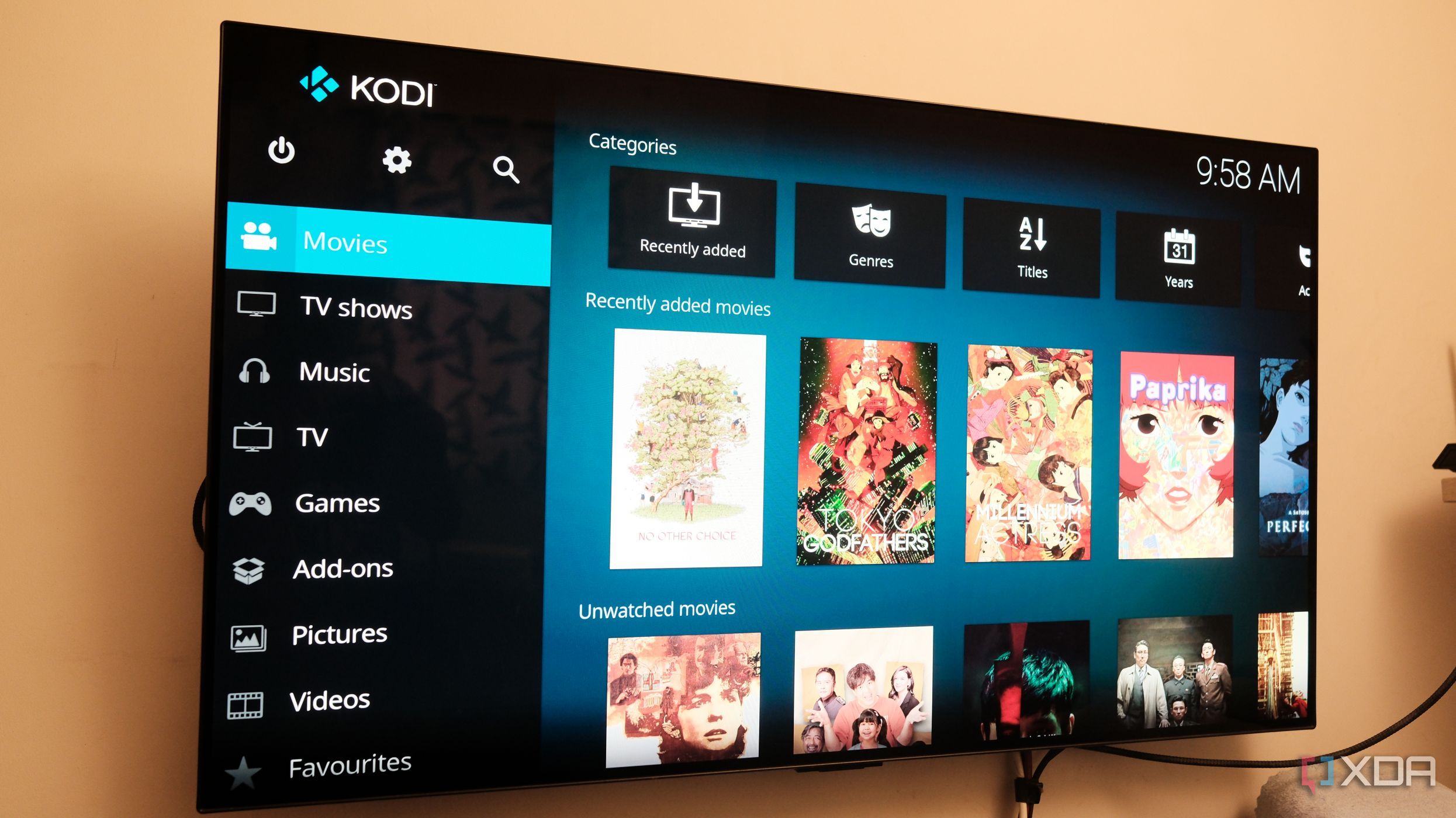
While modern smart TV software is organized around apps, LibreELEC is organized around media. That sounds like a small difference, but it changed everything about how I interact with my content library. I pointed LibreELEC to the network share on my home server and let it automatically scrape metadata. Within a few minutes, LibreELEC’s home screen was full of movie posters, cast information, ratings, trailers, plot summaries, and media codec details. It looked like a Netflix version, but every title and layout felt like mine. The library management is what sets it apart. I set up the popular databases — TMDB for movies and TVDB for TV shows — to fetch and sync metadata. Even the multiple versions of the same movie got labeled cleanly. Since I already run Jellyfin, I installed the Kodi plugin, and the watched content status syncs between Jellyfin and Kodi. No smart TV’s built-in library comes close. Add-ons extend the capabilities further. The YouTube add-on delivers an ad-free experience without the Shorts. Live TV enthusiasts can check out the TVHeadend add-on and use it with a DVB USB stick. That’ll transform a Pi 4 into a full DVR with live TV, scheduled recordings, and a programming guide. All major streaming services use Widevine DRM, and LibreELEC doesn’t support it. So I use a Fire TV Stick with a Projectivy launcher on the TV. For control, my existing LG remote worked over HDMI-CEC without plugging in any extra hardware to the Pi. That frees up the keyboard and mouse from the Pi 4.
Audio and video settings are in a different league
Expert-level customizations
This is where I realized why home theater aficionados sing praises for Kodi. Smart TVs quietly fall short here with their web-wrapper-like apps. By default, Kodi automatically matches the display’s refresh rate to the content’s frame rate. That means the movies play at 24p and there is no judder in panned shots. The audio passthrough works cleanly, especially if you have a soundbar or an AV receiver that supports Dolby Atmos or DTS:X. I use a HomePod (1st Gen) with my TV via eARC, and Kodi bitstreams the audio signal directly without letting the TV reprocess it. Granular video calibration settings for Zoom, overscan correction, and subtitle positioning help deeply customize the viewing experience. Some of these settings are buried deep in a typical smart TV.
Your TV knows more about you than you think
Smart TVs are watching you back
The smart TVs today capture what you watch on the screen and send that data back to the manufacturer via Automatic Content Recognition. Most manufacturers enable usage tracking and ad targeting by default, especially on preloaded streaming apps. The opt-out options for the same are nestled deep within the settings.
LibreELEC collects no data, has no account, and has no terms of service you need to accept. There’s nothing phoning home. The home screen shows exactly what media I mapped to the library with the add-ons and layout I chose. After years of dealing with the “you might also like” push on smart TV platforms, getting control back feels more significant.
Related
Jellyfin finally feels good on my TV, but I had to stop using the default client
Wholphin is the Jellyfin client Android TV should have shipped with.
LibreELEC is worth it, but isn’t for everyone
LibreELEC is worth it, but it isn’t plug-and-play. Setup takes genuine effort, and sustained 4K streaming sessions call for a heatsink or an active-fan case like the Argon40. If that sounds like a dealbreaker or too much work to you, then a Fire TV Stick with a custom launcher like Projectivy is a better call. If you put in an hour, it’d be hard to give up what you get. Smart TV software ages badly, as manufacturers charge a premium when you buy a TV and then quietly stop updating it a few years later. LibreELEC doesn’t do any of that. There’s no telemetry that gets re-enabled, no content recommendations, and no promoted content in your face. You get to command the layout and your library. Of course, you can swap out the Pi with better hardware when you need more headroom. Your TV stays smart. You get to decide who runs the show.
Diterbitkan : 2026-06-20 00:01:00
sumber : www.xda-developers.com