
The Flipper Zero team built the best productivity device I’ve ever used, and it doesn’t need the cloud at all
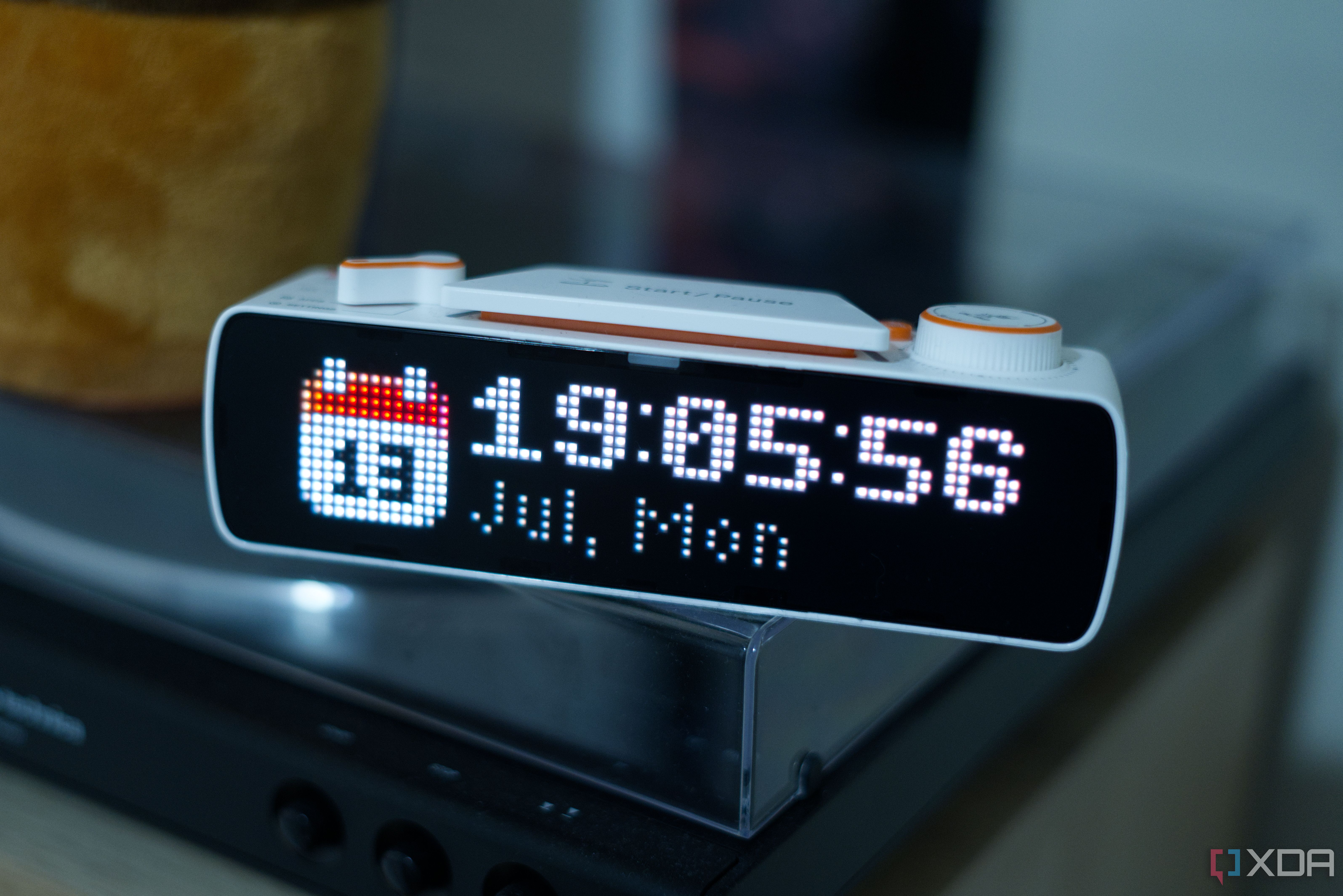
Most desk “focus” gadgets fall into one of two camps; either they’re a glorified status light that turns red when you’re on a call, or they’re a closed pixel-art toy that shows you the weather and locks you into someone’s app and cloud. I’ve seen enough of both to be wary whenever a new one turns up, because the useful-sounding ones tend to be the ones you can’t change, and the fun ones tend not to actually do much. The BUSY Bar is the first one in a long while that made me rethink the entire category of products. It’s a small desk device with an LED pixel screen on the front and a second screen on the back, it runs a focus timer, it shows your status to the room, and it happens to be one of the most open pieces of consumer hardware I’ve plugged into a computer in a long time. That last part isn’t a coincidence, because it comes from Flipper Devices, the team behind the Flipper Zero, and the same open-it-up-and-script-it attitude can be found here, too. Right now, it’s not a finished product. There are a few features which are only reachable in slightly awkward ways right now, and a decent chunk of what’s promised is still on the roadmap. Still, the core of it works offline, out of the box. I’ve had one on my desk for a good few weeks now, and the more I poked and prodded at it, the more I loved it. I’ve never had a productivity device earn a permanent spot on my desk, but this one has.
9/10
Compatibility
Wi-Fi, Bluetooth 5.4, Matter
Price
$249
Battery
18650 Li-ion
The BUSY Bar is a productivity device, hacker project, and smart display all in one. You can use it for basic Pomodoro timers, letting others know that you’re on a call, or for whatever you want to develop for it thanks to its open API. There’s no cloud dependency requirement, and it’s easily repaired.
Pros & Cons
Completely open for development, repairs, and modding
Incredible attention to detail
Great, bright, beautiful screen
Practically designed
On the expensive end of the spectrum
The BUSY Bar is a two-screen desk device you’ll actually use
One for you, one for the room
The front of the Bar is a 6.35-inch 72×16 RGB LED matrix with a 60 Hz refresh rate, and it faces outwards when mounted on a monitor, with the goal being that it can flag to the room whatever your current status is. That display can show text and pixel art, it’s rated at 800 nits, and it’s bright enough to read across a room. The back has a 1.54-inch 160×80 monochrome OLED that can be the part that faces you, while also mirroring what’s on the front. It adds additional features the front can’t fit too, like the battery level, network state, and additional settings. For example, when setting up Matter, the Matter pairing code will be shown here. This configuration is particular great, because you don’t have to use it like that. The reason a monochrome display is used to face the user is because it’s less distracting; having it be gray scale makes it “boring”, but you also don’t have to use it like that. Most of the time, I’ve actually had the big screen visible towards me, though I’ll admit that having a screen meant for the room and a separate screen meant for you sounds obvious once you’ve used it, but almost nothing in this category has done it before. The outward-facing screen, which you can also use as just the regular screen if you’d prefer, looks really good, too. The controls did more to win me over than either screen, though. The start and pause button is built on a Kailh Choc V2 low-profile mechanical switch, so starting a session is a proper click rather than a mushy tap on a touch target. A scroll wheel moves you through menus and sets times while doubling as OK and skip, a physical selector flips between your configured modes without you reaching for your phone, and a back button steps you out of whatever you’ve opened. It’s one of the most intuitive devices I’ve ever used, and the controls themselves feel incredibly premium and tactile. It’s an absolute joy to use and flick through menus on.
The BUSY Bar is powered by a single 18650 cell, the same standard lithium-ion you’ll find in plenty of flashlights and battery packs, and Flipper quotes around seven and a half hours of active use at automatic brightness, or roughly a week of standby with the display off. It charges over USB-C, sits happily on a desk, and because the mount is built into the body, the same unit clips onto the top bezel of a monitor if you’d rather have it at eye level. There’s even a built-in speaker, which isn’t exactly world-class, but it sounds good enough for internet radio and other, more basic audio forms that aren’t just purely music listening. Finally, there’s an STM32U595 doing the main work and a Silicon Labs SiWG917 handling Wi-Fi 6 and Bluetooth LE 5.4 inside, and Flipper has also published an official iFixit teardown. The whole thing comes apart with screws and clips rather than glue, which makes sense given that it’s from the team that made the Flipper Zero. Everything about this device feels practical, and from a design and a software standpoint, it feels like an incredible display of attention to detail.
Statuses and focus sessions are what it’s built around
A Pomodoro timer you’ll actually use
The heart of the Bar is a pair of modes on the physical selector, called BUSY and CUSTOM. They’re functionally identical, which sounds odd until you use it, because the point is that you set each one up differently. I have one configured as an office-style status that says I’m in a meeting, and the other as a solo Pomodoro, so moving between the two means flicking the selector rather than a dig through a menu. A session is a status plus a timer, where the status is whatever you want the room to see and the timer can be a plain countdown. Some statuses can also switch on by themselves, so ON CALL appears automatically when your microphone or camera is in use from a linked device, and you can hook up Google Calendar so a session starts on its own when a meeting does. It’s admittedly a small thing, but not having to remember to flip the status manually is most of the value of a status device. When you pair the Bar with the free BUSY App, it can start blocking apps as well as signaling. During a session it can mute notifications and stop selected apps from opening across your linked devices. I didn’t put the blocker through a serious stress test, since that isn’t really where my interest lies, though it does work. The idea is that the button which can show the room that you’re busy also takes your phone off the table. On the smart home side, the Bar is Matter-certified. Right now it shows up to your smart home as a Matter on/off switch, so you can have automations fire when a session starts, dimming the lights or changing what’s playing when you go busy. A native, gold-tier Home Assistant integration built on the device’s own API is on the way, but it isn’t here yet, so for the moment the on/off switch is the extent of it.
The open API is what makes it extensible
I built my own Spotify app
The Bar runs its own HTTP server, so the API lives on the hardware itself rather than in an app or a cloud. It’s incredibly open, which is the clearest strand of Flipper DNA available to see. It’s also, in my view, what will keep people using the Bar in the long-term. When you plug it into a computer over USB, it comes up as a USB Ethernet device running its own DHCP server, meaning that no setup is required to reach it at its fixed address of 10.0.4.20. All you have to do is open that in a browser and you get a local control page with no account and no install, and adding /docs to the address gives you the full interactive API spec for viewing. It’s a standard OpenAPI 3.1 setup, with plain JSON sent over HTTP, making it possible to interface with using basically any language that you like. Over USB it’s open by default with no token, and a single bearer token covers you when you go through BUSY’s cloud instead. Through the web UI, you can paint on the primary screen, drive the statuses and the focus timer, control any of the settings, and subscribe to live status and screen updates. There are official libraries too, so you don’t have to manually write your own requests: there’s busylib on PyPI for Python, and @busy-app/busy-lib on npm for TypeScript.
To actually test it out, I wrote a small widget that shows my Spotify now-playing on the front display, using the Python library and Spotify’s scripting support on my Mac. It was shockingly easy; the documentation was easy to follow, the library worked as it should, and I had it drawing a scrolling track title next to a small Spotify icon far faster than I expected. It’s an incredibly pleasant device to develop for, and reading the documentation and building that project took under an hour. I ran into a weird issue here, where an accent in a track title caused it to lock up, so I had to reset the device and update my code to strip those out. As someone who’s developed a lot for the ESP32, though, this didn’t really come as a surprise.
I think building for this device will be incredibly popular, and the team has published videos of countless demos including their own Spotify widget, which served as the inspiration for mine. As well, they’ve shown off an internet radio, weather report, a hydration reminder, a habit tracker, a typing-speed readout, a USB audio visualizer, Tetris, and even a Counter-Strike 2-themed latency graph that updates in realtime. I’m a big fan of that one. One other demo that that caught my eye was a proof-of-concept that shows your live Claude usage limits and lets you approve or deny Claude Code requests from the Bar itself, which shows just how open the device really is. It’s a lot like the Claude Desk Buddy that I built with a WT32-SC01 Plus, except it’s on the BUSY Bar. If you don’t write code at all, BUSY even documents how to use an LLM to generate code that makes the API calls for you from a plain description of what you want, which great given how the API is simple and well documented. Either way, nothing here is locked away from you, and the hardware is open and accessible to anyone. If you want to check out my Spotify widget, it’s available on GitHub.
Nothing else on the market does all of this at once
This is a unique combination
The category the Bar sits in is really two that don’t usually overlap. On one side are the corporate busy lights, the Luxafors and Embravas and Kuando Busylights, which run somewhere between $40 and $130 and do a single job, mirroring your Teams or Slack presence with a colored glow. They’re perfectly good at it, and a few even expose an API for the light itself, but they don’t show information, they don’t run a timer, and they don’t do anything about the phone buzzing next to your keyboard. Next to the Bar they feel like one feature pulled out and sold on its own.
On the other side are the pixel displays, the LaMetric Time, the Tidbyt, and Divoom’s Pixoo line, which are lovely little information screens but were never built to signal anything to the room or block a distraction. On price the Bar lines up almost exactly with them, since a LaMetric Time and a Tidbyt Gen 2 both sit around $199. Where they differ is openness, because most of them require a companion app and a cloud, and Divoom in particular keeps you firmly inside its own walled garden.
The closest thing to a true rival on openness is the Ulanzi TC001, a roughly $50 pixel clock the community has thoroughly cracked open with the AWTRIX firmware, to the point that people already run Pomodoro timers and Home Assistant widgets on it. It’s a lot cheaper than the Bar and has a real head start with tinkerers, and if all you want is a hackable matrix on your desk, it’s a bargain. But it’s smaller and lower resolution, it has no Matter support out of the box, its status-to-the-room story isn’t really there, and it asks a good deal more of you to reach any of it.
Tidbyt, meanwhile, is a cautionary tale that makes the Bar’s whole approach look smart. It built a well-loved pixel display, then was acquired by Modal, stopped making new units, and left its existing devices leaning on a cloud backend they now depend on staying online. Owners answered with Tronbyt, a self-hosted server that frees the displays from that cloud, which is something the BUSY Bar is built to avoid from the start. Its API lives on the hardware, and it can run with no account and no internet at all. In other words, if BUSY disappeared tomorrow, the BUSY Bar would carry on doing everything it does today. Tidbyt owners can’t quite say the same.
There’s enough here to love it already, even if it’s unfinished
There’s more to come
For all that I like it, the Bar is inconsistent about where you find things. The HTTP API over Wi-Fi, for instance, can only be switched on from that local web page, which you first have to reach over USB. So to use the Bar wirelessly, you start out wired, which is a slightly odd first step for a feature whose whole appeal is being on the network. The pixel Draw Tool, similarly, lives only in the device’s local web interface rather than the phone app. However, things are moving fast. For example, you can now draw a custom status, save it to the device as an image, and show it again later, which was a feature added recently and wasn’t possible when I received my unit.
As well, over USB, the API answers with no authentication at all, and when you enable it over Wi-Fi the Bar itself warns you that anyone on the same network can reach the device unless you set a password. That’s fine for a desk device that only exists on your home network, but it’s also nice that they thought to add a password option in case you find yourself using it on a public network.
The bigger caveat is that we’re still waiting for some things to arrive. The firmware is meant to be open source with the repository public on day one, and I’ll be coming back to this article to check if it went live at publishing time. As well, there’s going to be a JavaScript runtime for building standalone apps that runs on the Bar itself, which has been promised in the next couple of months. The third-party integrations amount to Google Calendar today, with Microsoft Teams, Slack, Notion, and Upwork on the roadmap to come. As well, features like stats and recommendation features, the apps marketplace, and the native Home Assistant integration are all coming soon, too. The device still more than does its job now, but if a specific one of those features is a large part of why you’re buying it, it’s better to wait.
The BUSY Bar goes on sale today, July 14, exclusively on the BUSY site, at $199 for the first 3,000 units and rising to $219 before rising to $249 after that. People who were on the waitlist got it for a $179 price. That isn’t cheap for a desk display, and you can build pieces of it for a lot less if a single piece is all you’re after. However, what you can’t get anywhere else is the combination. Something that amalgamates all of that into one product is a rarity; there’s no single, well-made device that signals to the room, blocks your distractions, ties into your smart home, and opens itself completely to scripting. Especially not one that doesn’t even care about a cloud you don’t control.
That combination, plus how much I enjoyed using and building for it, is why I absolutely love it. Some aspects of the BUSY Bar are still regarded as a promise, but what’s here right here and right now are still phenomenal. Flipper set out to make a productivity device that behaves like their other hardware, which is to say one you’re trusted to take apart and make your own, and on that, they’ve absolutely succeeded.
Diterbitkan : 2026-07-14 13:00:00
sumber : www.xda-developers.com