
Razer will never give the Blade 18 Linux RGB support, so I patched it into openrazer myself
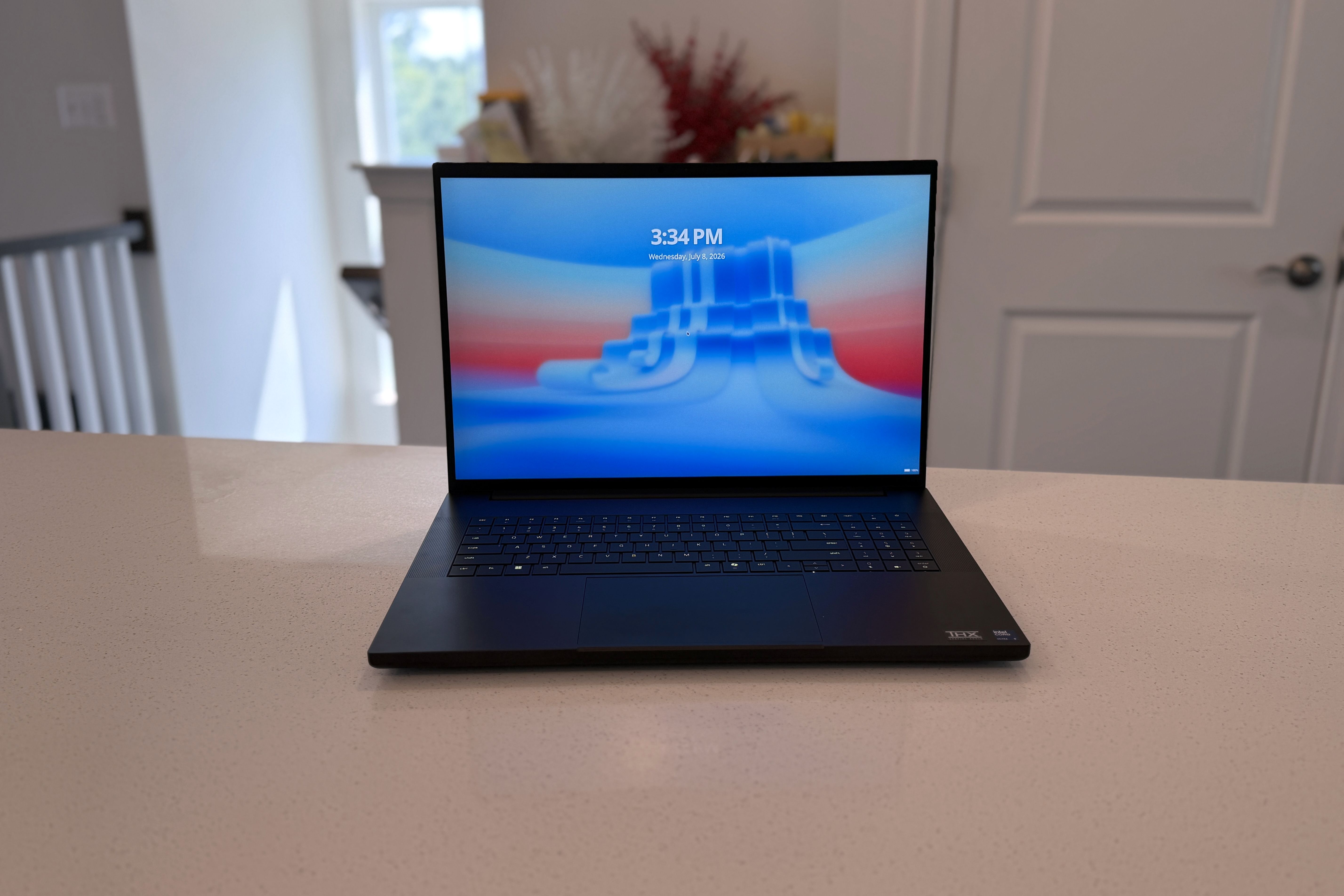
Let’s face it, nobody buys a $5,400 gaming laptop to run Linux on it. Except, apparently, me — because the moment the 2026 Razer Blade 18 landed on my desk, Windows lasted about as long as it took to unbox. I’ve wanted a proper Linux desktop replacement laptop for years, and a machine with an RTX 5090, a dual-mode 440Hz OLED-rivaling panel, and Razer quietly pursuing Ubuntu certification felt like the moment to try. Here’s the verdict up front: the Blade 18 is a genuinely excellent Linux machine, and almost none of that is thanks to Razer. The hardware cooperates beautifully. The software support simply doesn’t exist — no Synapse, no RGB control, no fan curves, and a hidden performance penalty that costs you half your frame rate until you fix it. So I fixed it. All of it. By the end of this review, I’d patched this laptop into two community projects, submitted the changes upstream, and doubled my benchmark scores in the process. Don’t make the same mistakes I did. Or do — they were pretty fun. About this review: Razer loaned us the Blade 18 (2026) for review and did not have any input on the contents of this article prior to publication.
9/10
CPU
Intel Core Ultra 9 290HX Plus
GPU
Intel iGPU, Nvidia RTX 5070 Ti, 5080, or 5090 mobile
Display type
Dual-mode IPS
Display (Size, Resolution)
18-inch UHD+ 240Hz (3840×2400) | FHD+ 440Hz (1920×1200), 600 nits brightness, 3ms response time, Calman Verified, 100% DCI-P
The Razer Blade 18 is powerful and gorgeous to use, with a UHD+/FHD+ dual-mode display for high resolution or high refresh rate, and the latest Intel and Nvidia chips. And it works on Linux, as Razer is currently pursuing Ubuntu certification.
Pros & Cons
Dual-mode display is gorgeous (even if you need to reboot to change modes)
Improved cooling system works well
Powerful performance while on Linux
Keyboard could have better tactile feedback
Battery life isn’t great
Expensive
It’s a Blade, and you know exactly what that means
The hardware writes checks the software can’t cash — yet
The 2026 Blade 18 is peak Razer industrial design, which is to say it’s a MacBook Pro that went to therapy and came out gothic. The all-aluminum chassis is impossibly thin for what’s inside: an Intel Core Ultra 9 290HX Plus, an RTX 5090 Laptop GPU with a full 24GB of GDDR7 at 175W, 32GB of 6400MHz memory, and the party trick: an 18-inch dual-mode panel that runs at either 3840×2400 at 240Hz or 1920×1200 at a frankly silly 440Hz. My config rings up at $5,400, and you can push it to 128GB of RAM if your wallet hasn’t tapped out yet. The keyboard is decent, the glass touchpad is enormous, and the whole thing exudes the confidence of a machine that costs more than my first car. But it’s a Blade. You knew all of that already, and so did I. The design isn’t the story. The story is what happens when you wipe the drive and find out how much of this laptop still works when Razer’s software isn’t in the room.
CPU
Intel Core Ultra 9 290HX Plus
GPU
Intel iGPU, Nvidia RTX 5070 Ti, 5080, or 5090 mobile
Display type
Dual-mode IPS
Display (Size, Resolution)
18-inch UHD+ 240Hz (3840×2400) | FHD+ 440Hz (1920×1200), 600 nits brightness, 3ms response time, Calman Verified, 100% DCI-P
RAM
Up to 128GB DDR5-6400
Storage
Up to 2TB NVMe SSD
Battery
99Wh Li-ion, 400W power adapter
Charge speed
50% in 30-min, 80% in 48 min
Ports
3x USB-A 10 Gbps, 1x Thunderbolt 5, 1x Thunderbolt 4, 2.5 GbE, HDMI 2.1, 3.5mm audio, SD card reader
Operating System
Windows 11, Linux
Webcam
5MP IR, privacy shutter
Cellular connectivity
No
Wi-Fi connectivity
Wi-Fi 7
Bluetooth
Bluetooth 5.4
Form factor
Clamshell
Dimensions
0.86 – 1.1 x 15.74 x 10.84 inches (22.79 – 28.7 mm x 399.96 mm x 275.4 mm)
Weight
7.06 pounds / 3.10 kg
Speakers
6 speaker array (two tweeters, four subs), THX Spatial Audio, 7.1 codec support via HDMI
Colors
Black
Pen compatibility
No
What already works on Linux is more than I expected
CachyOS ran everything — including the 440Hz mode Razer forgot to document
I installed CachyOS — Arch Linux for normal people, and my current daily driver — and the basics just worked: Wi-Fi, audio, webcam, suspend, the works. Even the platform power profiles show up in Plasma’s battery widget, and VRR works on the internal display in both hybrid and dGPU modes; historically the exact combination that fell apart on NVIDIA laptops.
The dual-mode display needed one secret handshake. The panel advertises only one personality at a time, and on Windows, you switch via Synapse, which doesn’t exist on Linux. The switch is actually in the BIOS: Advanced > Native Display Mode, where you pick 3840×2400 or 1920×1200. Flip it, boot, and Linux sees a native 440Hz panel. One gotcha: the panel’s EDID marks 1920×1200 at 60Hz as preferred, so check your display settings after switching, or you’ll be running a 440Hz screen at sixty like I nearly did. And can the hardware feed it? At 1200p, CS2 on the community benchmark map averaged 731 fps — 1.66 times the panel’s ceiling — while Shadow of the Tomb Raider’s native Feral port hit 240 fps at highest settings. The dual-mode design suddenly makes sense: maxed AAA and development work for the 4K 240Hz personality; esports for the FHD+ 440Hz one.
Until something speaks Razer’s protocol to the embedded controller, every Blade 18 running Linux pays an invisible 50% performance tax
But those numbers came with a catch that took me an entire evening to find. Out of the box, this laptop boots with its embedded controller in an unmanaged power state, and nothing in the standard Linux stack — not platform profiles, not PowerMizer, not nvidia-powerd — can touch it. My first benchmark runs were roughly half of these figures: 126 fps in SOTTR maxed, 331 fps in CS2. Same settings, same silicon. The EC sits above everything else in the power hierarchy, and until something speaks Razer’s protocol to it, you’re paying an invisible 50% tax. And I don’t like that.
Related
CachyOS beats SteamOS on my ROG Ally X, and Windows 11 isn’t even in the running anymore
Power-constrained handhelds deserve a tuned, minimal operating system to get out of your game’s way
Razer wouldn’t give me RGB control, so I gave it to myself
openrazer had never heard of this laptop — for about four hours
The community answer to Synapse’s absence is openrazer, the open-source driver and daemon behind every Linux RGB tool worth using. There was just one problem: the 2026 Blade 18 wasn’t in its device tables. Not openrazer’s, not anyone’s. The laptop was too new; the lists hadn’t caught up. Sure, I could have filed an issue and waited. But the USB protocol on Razer’s keyboards barely changes between generations, and the 2025 Blade 18 was already supported — so I found my machine’s USB product ID (1532:02e1, for the three other people who own this thing and run Linux), and mirrored the 2025 entry across openrazer’s kernel driver, daemon, and udev rules. Sixteen case statements, one device class, one PID in an allowlist. Built it with DKMS, rebooted, and watched the driver report “Razer Blade 18 (2026)” back at me from sysfs — a string that hadn’t existed anywhere that morning.
The driver reported “Razer Blade 18 (2026)” back at me from sysfs — a string that hadn’t existed anywhere that morning.
Then I wrote “1” into the spectrum effect file, and the entire keyboard started cycling colors, driven straight from the kernel with no daemon, no GUI, and no Razer software on any operating system. That’s already a win. Everything above it worked too: Polychromatic sees the keyboard, per-key custom effects address the full matrix correctly, and every stock effect — wave, ripple, reactive, starlight — runs exactly as it would through Synapse. The patch is now PR #2860 on openrazer’s GitHub, so with any luck, future Blade 18 owners get all of this by installing a package like civilized people. If you’re listening, Razer: this took one afternoon.
Related
OpenRazer 3.12 adds Linux support for a good selection of new Razer accessories
Check if yours now works on Linux
Fan control, TDP, and the touchpad needed the same treatment
The fix that accidentally doubled my frame rate
RGB is cosmetic. The EC performance tax wasn’t, and killing it meant porting a second project: razer-control-revived, the community’s Synapse-style fan and power tool. This port was almost embarrassingly easy — the entire device table is a JSON file, and support for my machine was literally one line naming the PID and fan range. Plus one more PID added to its udev rule, which by my count made four separate allowlists this laptop had to be introduced to before Linux fully spoke to it. The hardware was never the problem. Every barrier was a list missing a line.
The payoff was immediate. Setting the EC to Gaming mode took SOTTR from 126 to 240 fps maxed and CS2 from 331 to 731 — a 90 to 121 percent jump from a fan-control utility, which is the kind of sentence I have to read twice even after having written it. Don’t get too caught up in the exact figures; the shape of the table is the point.
Benchmark (1920×1200, AC power)
EC unmanaged (Linux default)
EC Gaming mode
Gain
Shadow of the Tomb Raider, highest
126 fps
240 fps
+90%
Shadow of the Tomb Raider, lowest
194 fps
317 fps
+63%
CS2, FPS Benchmark map
331 fps
731 fps
+121%
The GUI gives you all five Synapse power profiles, manual fan RPM control, battery charge limits, and live sensor data. GPU-mode testing turned out equally tidy: hybrid mode costs nothing measurable in SOTTR and about 11% in CS2, so run hybrid for battery life and flip the BIOS to dGPU when you’re chasing frames.
Benchmark (EC Gaming, 1200p@440)
dGPU-only
Hybrid
Hybrid cost
SOTTR, highest
240 fps
247 fps
None
SOTTR, lowest
317 fps
331 fps
None
CS2, FPS Benchmark map
731 fps
~650 fps
~11%
Oh, and the touchpad. Palm rejection was hopeless while typing, because libinput’s disable-while-typing feature only pairs internal keyboards with the touchpad — and the Blade’s keyboard announces itself as a USB device, so Linux politely assumed it was external. A five-line quirks file telling libinput the truth (AttrKeyboardIntegration=internal) fixed it completely. The fifth fix on my list if you’re counting.
Not everything bends: nvidia-smi refuses power-limit writes on this GPU in every mode, even though it happily displays an adjustable range it will never honor. You get the EC’s profiles and PowerMizer’s tiers, which matches Synapse’s granularity — you just don’t get a wattage slider. But YMMV on whether you ever wanted one.
Related
Linux is slowly taking over my life as a PC gamer
It’s been happening right under my nose.
Should you buy the Razer Blade 18 (2026)?
You should buy the Razer Blade 18 (2026) if:
You want a no-compromise Linux gaming or development machine and the price doesn’t make you flinch
You’re comfortable with a BIOS trip to unlock the 440Hz mode and a config edit or two — everything is documented now (you’re welcome)
24GB of VRAM matters to you as much for local AI as for games — that’s enough to run a 120B local LLM on 24GB of VRAM with the right model architecture
You should NOT buy the Razer Blade 18 (2026) if:
You expect vendor-supported, works-day-one Linux — wait for the Ubuntu certification to land, or for the community patches to ship in packages
You’ll never leave the couch: on battery, this GPU performs like a much cheaper one
Let’s just say $5,400 buys a lot of desktop
This is the best Linux gaming laptop I’ve ever used, and it’s not even close. It’s also a machine whose best features required me to personally contribute code to two open-source projects. Both statements are true, and the second one is temporary: my openrazer patch is upstream, awaiting review; the razer-control fix is a one-line JSON edit anyone can make today; and Razer’s in-progress Ubuntu certification suggests the company has finally noticed Linux exists.
The Blade 18 spent one Sunday going from “no Linux support” to the most capable Linux laptop I’ve touched
The Blade 18 spent one Sunday going from “no Linux support” to the most capable Linux laptop I’ve touched, and the distance between those two states was never the hardware — it was four allowlists, one BIOS menu, and a company that builds machines this good and then pretends half the operating systems don’t exist. Fix the lists, and it’s spectacular. The next thing I need is for that pull request to be merged, so nobody ever has to read the middle of this review again.
9/10
CPU
Intel Core Ultra 9 290HX Plus
GPU
Intel iGPU, Nvidia RTX 5070 Ti, 5080, or 5090 mobile
Display type
Dual-mode IPS
Display (Size, Resolution)
18-inch UHD+ 240Hz (3840×2400) | FHD+ 440Hz (1920×1200), 600 nits brightness, 3ms response time, Calman Verified, 100% DCI-P
Diterbitkan : 2026-07-13 16:30:00
sumber : www.xda-developers.com