

I reach every service on my home server from anywhere without opening a single port
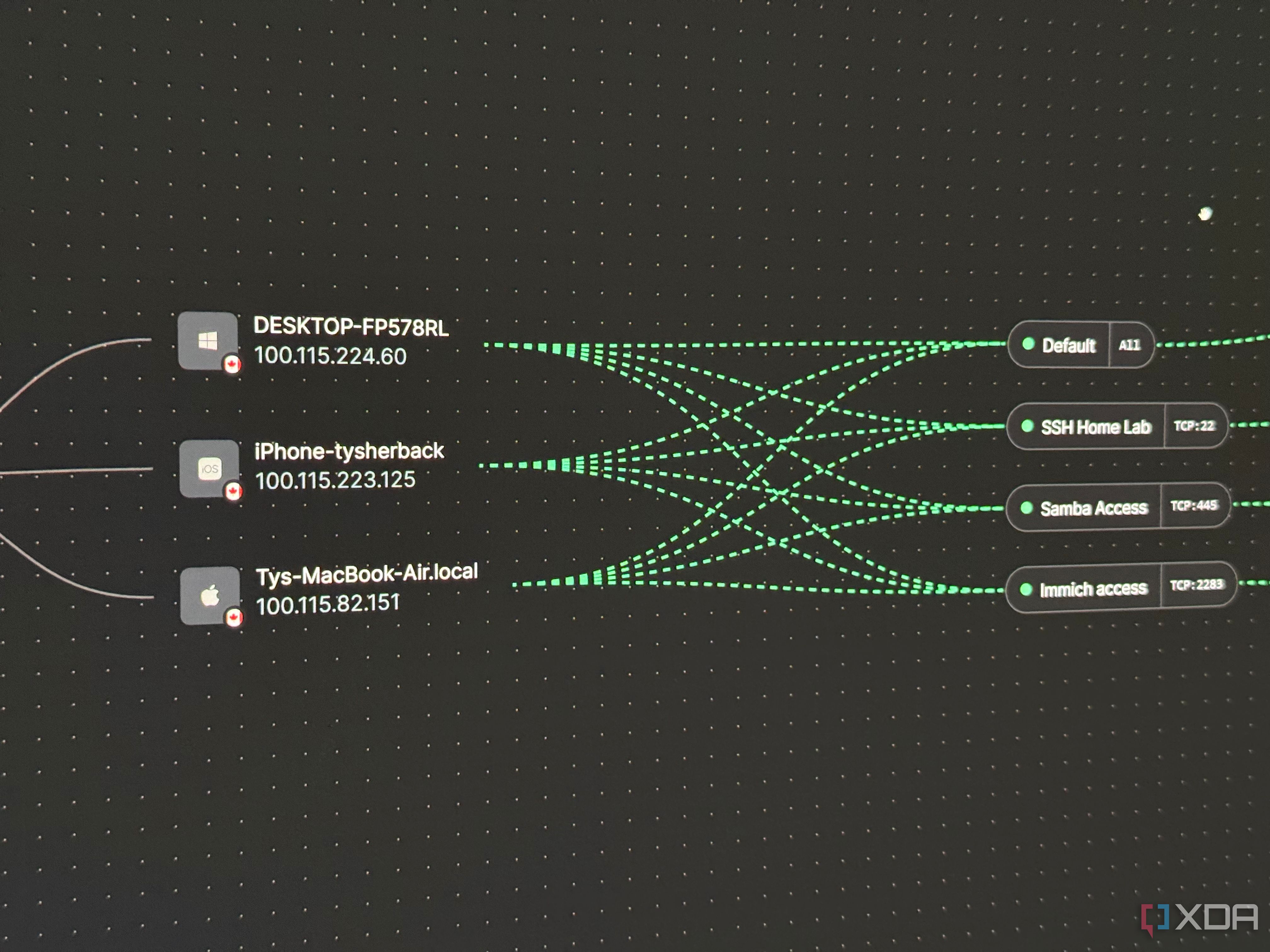
I recently went on a trip to my in-law’s cottage, and during that time, I still wanted access to my home lab stack. My Proxmox host and the LXCs inside, including a Samba share and Immich photo library, are examples of services that I still needed to be able to reach while being on the other side of the province. The standard approach for years to make this happen was some combination of port forwarding, dynamic DNS, and reverse proxies, but when my ISP put me behind CGNAT, even that stopped being an option. Instead of trying to fight against the grain, I rented a cheap VPS and set up a mesh VPN, allowing all of my services to be accessible from anywhere without opening a single port at home. It’s the best remote-access setup I’ve ever had, and I don’t think I’ll ever port forward at home again.
Related
9 reverse proxies you should check out for your home network
If you’re self-hosting any services, you’ll want a reverse proxy as another layer of defense.
Every forwarded port is a liability
You’re poking holes in your network that bad actors can potentially take advantage of
Port forwarding is a permanent opening in your home firewall that’s pointed at a service, advertised to the entire internet, ready to be scanned continuously by bots. That’s the reality, and it works up until a CVE drops for your particular service or a weak credential gets guessed, and then the thing behind that port becomes someone else’s foothold into your network. The mesh model helps invert this model, because services only listen on the encrypted overlay, there’s nothing for your router to forward, and nothing for a scanner to find. In my case, using NetBird, the client requires no inbound ports, because peers initiate all outbound requests and use ICE and STUN for NAT traversal. This is quickly becoming one of the best ways to get around CGNAT, and it’s no longer just a matter of philosophical preference.
Related
6 free tools every home lab needs
Level up your tinkering game with these neat utilities
Three services, three different ways you can expose them safely
NetBird handles all three easily
Now, not every overlay can handle exposing every kind of service, and this is the part that really pushed me towards using NetBird specifically. I can self-host the mesh and expose three different kinds of service, all without poking any holes in my home firewall. SSH to the Proxmox host is the simplest. The host runs the NetBird client, so it has its own address on the overlay, and I just SSH straight to that address like any other machine on a LAN. There’s nothing to be routed or proxied here, it’s just addressable the same way as it would be over a simple VPN tunnel.
My Samba share, which acts as my main NAS, is more interesting. It’s an LXC container on the same Proxmox host, with its own address on the LAN bridge. The host does double duty: it’s a peer in its own right for SSH, and a routing peer advertising that LAN subnet for everything living on it, containers included. The Samba LXC has no idea NetBird exists; the routing peer masquerades the traffic so return packets find their way back on their own. Even though I could install NetBird on the LXC, I don’t have to, and this is the same answer for anything that can’t run the client itself, like a printer.
Immich was the most complicated service to set up remote access for, but it’s also one of the most polished. It runs through NetBird’s new built-in reverse proxy, which serves it at a subdomain with a real Let’s Encrypt certificate. From any browser, it looks and behaves like a normal public web app, except the proxy reaches the origin over the mesh, so the photo library itself is never exposed. The same overlay is used here for three completely different services, and none of them require a port to be open at home.
Related
Stop port forwarding your self-hosted services: Do this instead
Say goodbye to the hassles of port forwarding with this secure, easy-to-use alternative.
You can decide exactly how exposed each service is
They can be accessed with a simple PIN, or locked down entirely
When you expose a service online with a forwarded port, it’s usually all or nothing, depending on the service and its own authentication measures. When hosting with an overlay like this, it’s not black and white at all. NetBird’s reverse proxy can put a service on the open internet behind real authentication like SSO, a shared password, or a numeric PIN, with access-control policies layered on top to scope which groups reach what. This is the mode I’d use when trying to set up a non-critical service for a family friend who doesn’t run a VPN.
But for anything I want to keep genuinely private, like my Immich share, there’s a toggle for NetBird-Only access, which drops the public door completely. Like a lot of the configuration, it took hunting through the Docker Compose .yml, but adding a flag and toggling it on allowed me to maintain access to my photos without having to expose the Immich front-end to the web at all.
Related
I rented a VPS to get around CGNAT, and it solved problems I didn’t know I had
I rented a VPS for a specific reason, but it ended up coming in handy for things I didn’t anticipate
Owning the whole path
Nothing is cloud-based if you don’t want it to be
The turnkey move would be to lean on a vendor’s cloud control plane and be done in ten minutes. I went a step further and self-hosted the whole thing on a VPS that I already pay for. The management, signal, relay, and STUN all live on a data center with a publicly accessible IPv4, allowing me to fully dodge CGNAT. That VPS does have ports open, but those serve NetBird’s control plane, not my services, and the data plane is peer-to-peer WireGuard, so most of the time the VPS isn’t even in the traffic path.
Related
I used a Cloudflare Tunnel to self-host Nextcloud, and I wish I’d thought of it sooner
After days of struggling to set up my self-hosted Nextcloud instance, Cloudflare Tunnel proved to be the cure I wish I’d thought of sooner
The downsides to this approach are real
It still wins, for me
I didn’t eliminate attack surface so much as relocate it, and arguably I added some. There’s now a VPS to patch, a management server to keep alive, a reverse proxy, and certificates to renew. That’s all very real additional operational overhead that could’ve been replaced by a turnkey Cloudflare tunnel or cloud-based mesh. Self-hosting the control plane also introduces a coordination single point of failure: if that server is down, I can’t enroll new peers or push config changes. And every device that wants into a mesh-only service needs the NetBird client, which is friction, but like a lot of these choices, it’s all intentional, and I wouldn’t do it differently.
The relocated surface is qualitatively safer: a probed STUN port on a VPS is a nothing-event, whereas a compromised forwarded SMB port are my sensitive NAS documents. There is a single point of failure, but if the control plane does go down, the existing connections aren’t necessarily severed. I am relying on a data center for uptime, but it’s extremely likely that they’ll be more reliable than if I hosted this at home, sans CGNAT. Cloudflare Tunnel is the closest real alternative, and it’s a good tool, but it routes your traffic through Cloudflare and terminates your TLS at their edge, which is the exact ownership trade that this setup avoids.
Related
If you’re not using them already, you need to set up Nginx reverse proxies in your home lab – here’s how
Reverse proxies are incredibly handy in the home lab, and Nginx is one of the best known.
Reach everything while exposing nothing at home
If you’re stuck behind CGNAT, or you’re just tired of treating your router’s port-forwarding page as a security control, this is worth an afternoon. Stand up a mesh, put your control plane on a cheap, rented VPS, and device service by service how exposed each one will be in a comfy GUI. Nothing at home has to face the internet, and your remote access is sorted for good.
Diterbitkan : 2026-07-12 12:00:00
sumber : www.xda-developers.com