
I love my dual-monitor setup, but these surprises caught me completely off guard
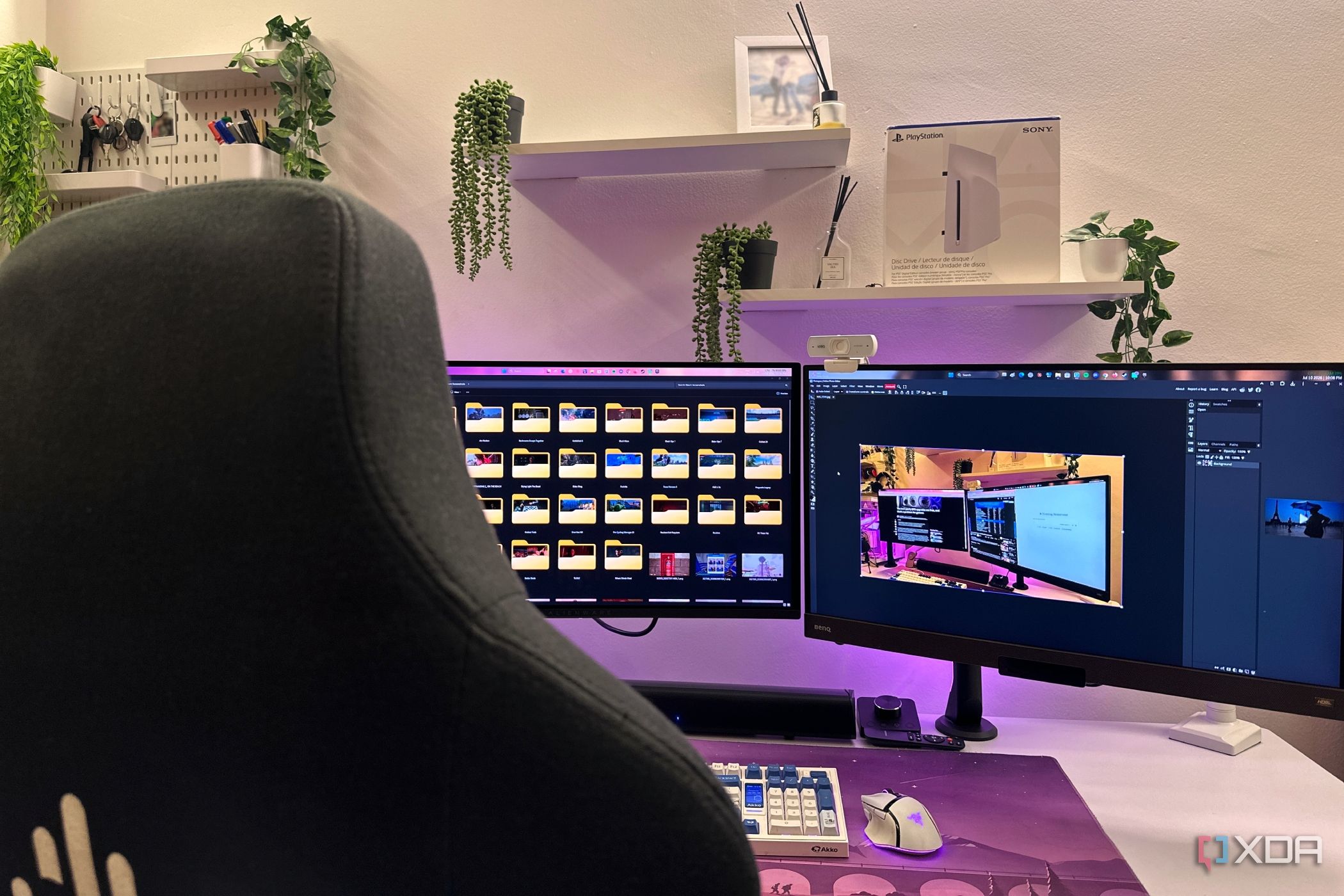
Dual monitors are a kind of upgrade that feels like an obvious win. What’s not to love, after all? Ever since moving to a dual-monitor setup, I have more screen space, better multitasking, fewer Alt+Tab gymnastics, and most importantly, YouTube on the second screen as I work on the primary display. These are all things I looked forward to when I brought a second monitor home. I’d definitely make the same decision again in a heartbeat, but owning two displays has definitely come with a surprising number of little compromises that I never saw coming. None of the “problems” I’ve run into are deal-breakers, per se, and they aren’t stopping me from recommending a dual-monitor setup, either. Still, they’re the kinds of everyday annoyances that I’ve only discovered after living with one for a while, and I do wish someone had warned me about them beforehand.
Related
4 reasons I refuse to sell my old IPS monitor after upgrading to OLED
My IPS monitor is still not done
There’s no going back to a single monitor… ever
Your expectations change almost overnight
The biggest thing nobody warned me about wasn’t something I’d have to buy or rearrange. It was that I’d quietly ruin single-monitor setups for myself, forever. After just a week of running two 1440p, 27-inch monitors together, I had to spend a day without one as I rearranged my entire setup. Immediately, everything felt out of place, because I had become too used to one screen being my active, primary display, while the other turned into permanent real estate for Spotify, Discord, benchmarks, reference material, YouTube, Instagram Reels, or half a dozen other browser tabs. I stopped thinking about where windows should go because every app naturally found a home, and split screens became a thing of the past on my primary display. Now, every time I sit down at a laptop or another desktop with a single display, I feel strangely constrained. I feel like I’ve moved from a king-size bed into a twin overnight. When I use a single-monitor display now, nothing is technically missing, but everything does feel cramped. My brain seems to have adapted to having two canvases instead of one. That’s what has made me look at dual monitors as a luxury, and start seeing a single monitor as the compromise now. In buying another monitor, I’ve permanently raised my own expectations.
Related
I ditched my dual monitor setup for an ultrawide monitor, and here’s what I regret
From dual screens to curved wonders: What was lost?
My old monitor suddenly doesn’t look nearly as good
Turns out comparison really is the thief of joy
Before I bought my new monitor, I genuinely loved the one I’d been using for years. The colors looked great, the refresh rate was more than enough, and I’d never once complained about its image quality over four years of ownership. Then, I placed a glossy new QD-OLED right beside it, and overnight, my trusty IPS panel went from “perfectly fine” to looking washed out, full, and almost… lifeless. Absolutely nothing to do with the first monitor has changed, because it was simply losing a comparison it never had to make before. Now, I find myself wanting to replace this monitor with an OLED panel, too. I didn’t expect this constant yearning for another OLED panel to be another unexpected expense of dual-monitor ownership at all. Now, I’m constantly noticing black levels, blooming, color vibrancy, contrast, brightness, and HDR performance every single time my eyes move from one display to another. Buying one fantastic monitor can sometimes make you appreciate your old one a whole lot less, and I’m afraid I might have fallen into a rather expensive rabbit hole already.
Related
I switched to OLED for my entire setup, but I had to keep an LCD around just for coding
My QD-OLED isn’t going anywhere. My code isn’t going on it, either
My monitor arm became useless overnight
One upgrade has a habit of snowballing into three
Considering how hardware prices are in 2026, I’d convinced myself I’d be happy spending money on a monitor arm this year instead of trying to save up for RAM instead. Sadly, I got one long before I considered adding a second display. As such, buying another monitor immediately forced me to rethink the entire setup. I could either remove my existing arm and replace it with a dual-monitor model, or buy a second single arm. Of course, they’d both have to fight for desk space, too, and soon enough, a simple monitor upgrade became a matter of a whole new shopping list. I did eventually go with another single arm to get the maximum amount of flexibility in either display, but this is still a classic case of hidden ownership costs. I didn’t expect to have to budget for an accessory that I’ve technically already bought once. Depending on your own desk and monitor sizes, you may even discover that your current arm doesn’t have enough reach or flexibility to position both displays comfortably. Adding a second monitor snowballed rather quickly into the beginning of several smaller purchases.
Related
Your monitor’s HDR settings are almost certainly wrong on Windows
Toggling HDR on is only part of the process.
I needed longer cables with a new monitor
Never thought cable length would become a real problem
When I bought my second monitor, I assumed the DisplayPort cable in the box would be more than enough. To its credit, it was, but my old monitor being pushed to the side made it sit further away from the UPS. This automatically meant that I needed a longer cable for my old monitor. A comfortable viewing angle was impossible without also spending money on a longer, 5-meter DP cable, which my old monitor now runs on. It’s not a huge expense by any stretch of the imagination, but it did catch me completely off guard. It should have been a simple five-minute setup, but it turned into another online order and a full day of waiting for the right length cable to arrive. This was another practical detail nobody mentions until you’re sitting there, cable stretched taut across your desk, wondering how you didn’t see this coming.
Related
I spent weeks chasing a DisplayPort problem that HDMI solved in seconds
Begrudgingly, I’m back on HDMI
My desk now feels half its original size
Two monitors do have a habit of taking over everything
I knew adding another display would take up more room, but I underestimated just how much the rest of my setup would have to adapt. My light bars were pushed further apart, and so were my speakers. My external microphone, too, had to get a new home, and so did my charging dock and the tiny bit of desk decor I’ve accumulated over the years. Monitor arms are supposed to decrease clutter, and yet, both my monitors occupy more space, and have even changed the way I used the space I already had. Sure, in reality, my desk itself hasn’t actually gotten any smaller, but it does feel far more difficult to find somewhere to put anything else. I’ve now begun eyeing desks larger than my 6.5-foot-long table, along with floating shelves, under-desk mounts, and cable trays just to reclaim my own workspace from my new dual-monitor setup. I’ve had to redesign my entire deck around the two-monitor setup now, but that, it seems, is the cost of adding another screen.
Related
Monitor arms aren’t just for aesthetics, and they’re the cheapest desk upgrade you’ll ever make
Learn why this inexpensive addition is a must-have for any desk setup, no matter your space or budget.
The neck strain creeps up on you
It wasn’t obvious until my body pointed it out
My first few days with two monitors felt fantastic as I constantly moved windows around, admired all the extra screen real estate I had gained. What I didn’t notice, however, was how much more my head was moving throughout the day. Every time I had to check Discord, or glance at a YouTube video, my neck gradually became part of my multitasking routine itself.
Plus, this particular problem didn’t even announce itself right out of the gate. It built over weeks of repeatedly turning my head instead of simply moving my eyes. This only served to make me realize just how important the angle for the secondary display was, and I had to resist temptation to put both screens smack next to each other, both facing me at all times. As such, a word to the wise: Dual monitors are absolutely worth it, but your neck will appreciate a little planning far more than it appreciates symmetry.
Resolution
2160×1440
Screen Size
27 inches
Brand
Alienware
Max. Refresh Rate
240Hz
Response Time
0.03ms
Inputs
2x HDMI 2.1, 1x DP 1.4
Related
Why I stopped buying smart TVs, and what I bought instead
Remember when smart features worked for us, instead of against us?
I’d still do it all over again, though
If you’re thinking about buying a second monitor, your shopping list might get longer than you expect.
None of these “surprises” have even come close to making me regret adding a second monitor. If anything, they’ve reminded me that the best upgrades aren’t always as simple as clicking “Buy Now.” Dual-monitor ownership has reshaped my entire workspace, my daily habits, and even the way I think about using my PC, bringing along a few unexpected compromises in the process. That’s just part of the dual-monitor experience, and I’d gladly accept these trade-offs again if I had to. So, if you’re thinking about joining the dual-monitor club, I’d say you should go for it. Just don’t be surprised if your shopping list gets a little longer and your desk looks a little different than you imagined. Those are small prices to pay for an upgrade that genuinely changes the way you use your computer every single day.
Diterbitkan : 2026-07-11 23:00:00
sumber : www.xda-developers.com