
I finally got Android Auto in my truck using a $50 adapter, and now I can’t imagine driving without it
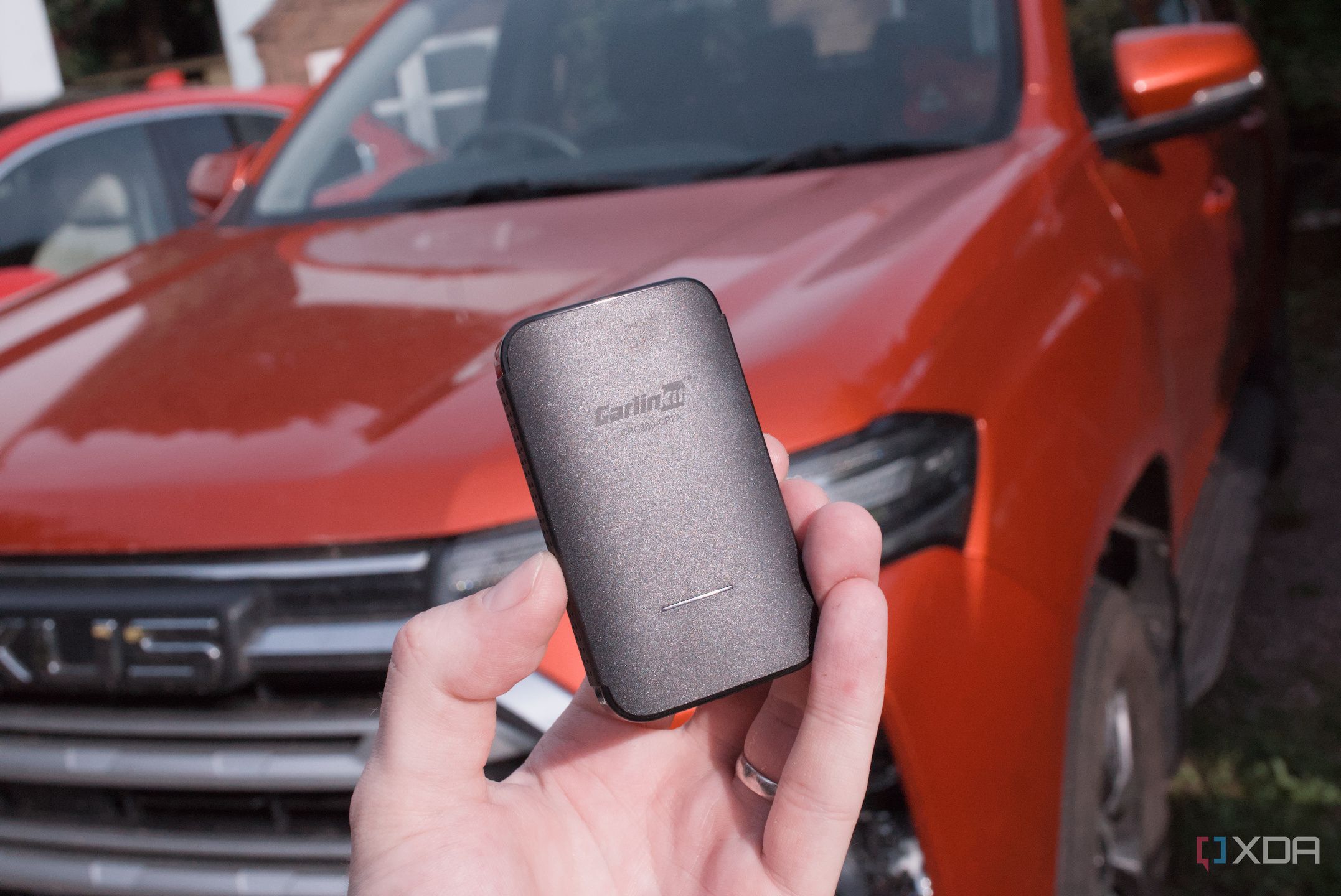
I drive just about as much as the average person n the UK, equating to around 12,000 miles each year. Most of that involves Android Auto and Apple CarPlay in some form, since I find these experiences to be vastly superior to what vehicle manufacturers can come up with. Android Auto is my choice with the Samsung Galaxy S23 Ultra, moving up from the iPhone 12, but there’s one problem with my Maxus T90 EV. It only supports wired Apple CarPlay. There’s no wireless support for either, which is fine, but there’s also no Android Auto. This is shocking for a vehicle released in 2023. That’s why I decided to grab a small wireless adapter from one’s favorite online retailer to see if this could be remedied. Turns out, it can, and it’s bloody brilliant.
Vehicle support is often questionable
For both CarPlay and Android Auto
Whether it has been my Seat Ibiza, Seat Leon, Cupra Leon, Cupra Formentor, or Maxus T90 EV, there’s one thing these vehicles have in common. Not only did I love the Spanish VW design and driving style, but they all have Apple CarPlay and Android Auto that either inconsistently work or flat out refuse to even function sometimes. Aside from the T90 EV, which doesn’t even have Android Auto, depending on which market you’re located in. I’m a huge fan of these systems as they’re often better than what comes with the car.
Quiz
8 Questions · Test Your KnowledgeAndroid Auto history and functionalityTrivia challengeFrom navigation to voice commands — find out how much you really know about Android Auto.NavigationConnectivityVoiceAppsSafetyBegin
Which wireless standard does Android Auto use when connecting without a USB cable?ABluetooth 5.0 onlyBWi-Fi Direct via the 5 GHz bandCNFC pairing with automatic handoffDZigbee over a local hotspotThat’s right! Wireless Android Auto uses Wi-Fi Direct over the 5 GHz band for a fast, low-latency connection. Bluetooth is still used in the background, but only to initiate and manage the pairing handshake.Not quite. Wireless Android Auto relies on Wi-Fi Direct over the 5 GHz band for its main data connection. Bluetooth plays a supporting role in establishing the initial pairing, but the heavy lifting is done over Wi-Fi.Continue
Which voice assistant is natively built into Android Auto for hands-free control?AAmazon AlexaBSamsung BixbyCGoogle AssistantDCortanaCorrect! Google Assistant is the heart of Android Auto’s voice control system. You can use it to send messages, make calls, get directions, and play media — all without taking your hands off the wheel.Not quite. Google Assistant is the built-in voice assistant for Android Auto. While Amazon Alexa has its own in-car experiences, it is not natively integrated into Android Auto the way Google Assistant is.Continue
Which of the following app categories is NOT officially supported on Android Auto?ANavigation appsBSocial media browsing appsCMessaging appsDAudio and podcast appsSpot on! Android Auto deliberately blocks general social media browsing to minimize driver distraction. Google’s design philosophy for the platform prioritizes safety, limiting apps to navigation, audio, and communication categories.Actually, social media browsing apps are the ones NOT supported on Android Auto. Google intentionally restricts the platform to navigation, audio, and messaging apps to keep drivers focused on the road.Continue
Which navigation app was among the first third-party apps officially supported on Android Auto at launch?AApple MapsBTomTom GOCWazeDHERE WeGoCorrect! Waze, which Google acquired in 2013, was one of the earliest third-party navigation apps to gain official Android Auto support. Its community-driven traffic data made it a popular alternative to Google Maps on the platform.Not quite. Waze was among the first third-party navigation apps supported on Android Auto. Since Google owns Waze, it made sense for it to be an early addition alongside Google Maps when the platform launched.Continue
In what year was Android Auto officially launched to the public?A2012B2013C2015D2017That’s right! Android Auto officially launched in 2015, following its announcement at Google I/O 2014. It debuted as part of the Open Automotive Alliance, a collaboration between Google and major automakers.Not quite. Android Auto was officially launched in 2015, after being unveiled at Google I/O in 2014. It was a cornerstone of the Open Automotive Alliance initiative that brought together Google and car manufacturers.Continue
What is the minimum Android version required to run Android Auto on a phone as of recent updates?AAndroid 6.0 MarshmallowBAndroid 8.0 OreoCAndroid 9.0 PieDAndroid 11Correct! Android 8.0 Oreo is the minimum Android version required to run Android Auto. Google periodically updates these requirements, so keeping your phone’s software current ensures you get the best Android Auto experience.Not quite. Android 8.0 Oreo is the minimum version needed to run Android Auto. Google raised the minimum requirements over time as the app took advantage of newer Android features and security improvements.Continue
Which music streaming service was among the launch partners for Android Auto’s audio app support?ATidalBSpotifyCApple MusicDDeezerExactly right! Spotify was a launch partner for Android Auto and remains one of its most popular audio apps. Its deep integration allows drivers to browse playlists, switch tracks, and control playback entirely through the Android Auto interface.Not quite. Spotify was actually one of the original launch partners for Android Auto’s audio support. Apple Music, as you might expect, is not available on Android Auto since it is tied to Apple’s ecosystem.Continue
What feature allows Android Auto to be used directly on a phone’s screen without a car display, introduced in 2019?AAndroid Auto Mirror ModeBAndroid Auto Desktop ModeCAndroid Auto phone screen modeDAndroid Auto StandaloneThat’s correct! Google introduced the Android Auto phone screen mode in 2019, letting users access the Android Auto interface directly on their phone even without a compatible head unit. It was later replaced by Google Assistant Driving Mode in newer Android versions.Not quite. The feature was called Android Auto phone screen mode, and it launched in 2019. It gave drivers access to the simplified Android Auto interface on their phone screen, which was useful for cars that lacked a compatible infotainment display.See My Score
Challenge CompleteYour Score/ 8Thanks for playing!Try Again
I recall having trouble getting either to work adequately in the Formentor, which is among the generation of vehicles with well-documented VW software issues. Frequent disconnections, the aforementioned trouble even getting the phone to connect, and system lag almost made it impossible to use, especially when navigating a bustling city where lane and road layouts make little sense. Waze is vital for my travels, though I try to make use of memory and available road signage, it’s often beneficial to have the sat nav running for traffic and other alerts.
Frequent disconnections, the aforementioned trouble even getting the phone to connect, and system lag almost made it impossible to use.
Although I still have my trusty iPhone 12, which has absolutely seen better days, it’s the Galaxy S23 Ultra that’s my daily driver and as such carries all my apps, data, and vehicular entertainment. Connecting it to the Maxus truck achieves nothing but providing a charge to the mobile device. I had to resort to using a dash holder for the phone, which feels like taking a defeat when CarPlay is present and actually works rather well inside the vehicle. That’s when I started looking for a device to work with the vehicle to add Android Auto support, or at least make it possible to use the phone more than Bluetooth.
Related
Android Auto is better when you disable most of your smartphone features
Keep your eyes on the road.
I finally found the answer
Meet the Carlinkit CP2A Pro
I’ve searched far and wide for Android Auto devices that can interact with a head unit that only supports CarPlay and QLink. I was hesitant to spend the money, even with generous return policies. That was until I stumbled upon the Carlinkit CP2A Pro and read a seriously in-depth review of a similar model that worked well. It essentially takes an Apple CarPlay connection between the device and the head unit and makes it possible to use wireless Android Auto or Apple CarPlay, even if your vehicle only supports wired CarPlay. This fits my vehicle perfectly, so I placed an order. On arrival, the device is just like any other that claimas the world when it comes to connecting your phone and vehicle together, and while I believed I had done ample research before making the purchase, there was a lingering feeling in the back of my mind that it wouldn’t work. Everything was carefully unboxed (just in case), and I headed to the truck. After turning the EV on and disconnecting my phone from the infotainment system, plugging in the CP2A Pro offered a new way to connect. All it took was to connect the adapter and its cable to the USB port designated for CarPlay passthrough, and we were all set. The device showed up as an available Bluetooth connection on the S23 Ultra, and as soon as that completed the handshake, Android Auto automatically started. All I needed to do was select Android Auto on the head unit, and we were in! Music started playing through Symfonium through the stereo, and I was greeted by the familiar home screen. There’s no noticeable lag, and I didn’t encounter any issues that would prevent me from comfortably using this over native Android Auto.
A few teething issues
It’s not perfect, though. The input lag becomes noticeable if you’re looking for it. It’s not terrible and distracting, nor is it much worse than older car infotainment systems that support CarPlay or Android Auto. There’s also audio lag, but that’s by design. It’s about a second behind the phone itself, and this setting can be adjusted in the unit’s interface. I left it as the default since I don’t foresee this being an issue. Calls are perfectly fine, too, outside of connectivity issues with the phone and nearby cell towers. I just find it incredible that I’m using wireless Android Auto in my truck.
Related
3 easy fixes that completely eliminated my Android Auto lag
Using a faster, higher-quality USB cable, updating your device, and freeing up RAM can help Android Auto run more smoothly.
Android Auto on CarPlay just works
But it shouldn’t be that surprising
Although these are different technologies developed by two very different companies, the underlying notion is the same. Both CarPlay and Android Auto use the phone to project what’s displayed in their respective apps onto the connected display. The vehicle’s infotainment screen essentially becomes a glorified touch screen monitor. And that’s really the point, since these systems are generally far superior to what’s included with most vehicles rolled out today. I just find it slightly jarring that this just works out of the box with very little configuration required, if at all.
I’m not going to lie to you, I was skeptical at first and was ready to kick off the Amazon returns process, but I’m thoroughly impressed that this won’t be required. The best part is I don’t even need to have my phone plugged in. Even when using the iPhone in the vehicle, it still needed to be connected to the designated USB port. That’s not the case anymore. Simply get in the truck, turn it on, and we’re already connected and good to go. There is one caveat with wirelessly projecting your phone’s display, and that’s battery drain, since you’re no longer required to be tethered to the car. But this is a minor gripe that can be overlooked, especially if you keep your phone topped up most of the time. Overall, I’m happy and managed to breathe much-needed life into my vehicle for the long journeys, and all it took was the purchase of a small dongle.
Brand
Carlinkit
Output
USB-A, USB-C
Cable Included
Yes
CONNECTOR
USB-A, USB-C
Color
Black
This is what allows me to use my Android smartphone with a vehicle that only supports wired Apple CarPlay. It’s brilliant.
Diterbitkan : 2026-06-06 15:30:00
sumber : www.xda-developers.com